Why Your AI Gets Guest Communication Wrong (And How to Fix It)


Why AI Gets Guests Wrong
Why bad data quietly breaks good AI
TL;DR
AI guest communication fails for one reason more than any other: bad data. When AI gives a guest the wrong check-in code, describes an amenity that no longer exists, or sends conflicting instructions for the same property, the model isn't broken. The knowledge base is. Operators who treat their knowledge base like a product, maintaining it, versioning it, and QA-ing it regularly, see far better results than those who set it and forget it.
We talk to a lot of operators. Covecasa, Golden Castle, Lakefront Luxury, Somos, and dozens more. When we dig into why their AI guest communication underperforms, the conversation almost always lands in the same place.
Not the model. Not the integration. The knowledge base.
The #1 reason AI gives wrong answers is that it was trained on wrong information. Outdated, duplicated, or incomplete data. And in short-term rental operations, that problem compounds fast.
The Three Failure Modes We See Over and Over
Most knowledge base problems fall into one of three buckets. Each one is fixable, but you have to know what you're looking for.

1. PMS Syncs That Create Duplicate Listings
When a property management system syncs to your AI, it often pulls listing data from multiple sources: the OTA listing, the internal PMS record, a manual override someone added six months ago. If those sources conflict, the AI doesn't know which one to trust. It picks one, often the wrong one.
We've seen this with operators managing 50+ units. A property gets renamed in the PMS but the old listing data persists in the AI's training set. The AI keeps referencing the old name, old unit number, or old address in guest messages. Guests get confused. The operator blames the AI. The real culprit is a sync that created two versions of the same property with no clear hierarchy.
2. Outdated Amenity Information
A hot tub gets removed after a maintenance issue. A parking spot gets reassigned. The pool hours change seasonally. None of that gets updated in the knowledge base because nobody owns it.
This is the most common failure mode we encounter. An operator sets up their AI in January, and by April the amenity data is already stale. The AI confidently tells a guest the hot tub is available. The guest arrives. It isn't. That's not an AI problem. That's a process problem.
3. Conflicting Check-In Instructions Across Properties
This one is especially damaging because it affects the highest-anxiety moment in any guest stay: arrival.
Operators with multiple properties often have check-in instructions that evolved organically, one property at a time. Property A has a lockbox. Property B uses a smart lock app. Property C has a front desk. When those instructions live in a single, undifferentiated knowledge base, the AI can pull the wrong instructions for the wrong property. A guest at Property A gets told to download an app that doesn't work at their unit.
Every one of these failures has the same root cause: the knowledge base was treated as a one-time setup task, not an ongoing operational responsibility.
Treat Your Knowledge Base Like a Product
The best operators I've worked with think about their knowledge base the same way a software team thinks about a product. It has versions. It has an owner. It gets tested before it ships. In our experience across 300+ teams, operators who treat their knowledge base as a living product resolve AI errors at least 3x faster than those who don't.
- Approach: Set and forget — Ownership: Nobody — Update cadence: Ad hoc — QA process: None — Typical outcome: Stale data, repeat errors
- Approach: Product mindset — Ownership: Named owner — Update cadence: Scheduled + triggered — QA process: Pre-deploy testing — Typical outcome: Reliable, consistent AI responses
That mindset shift changes everything. Instead of asking "why did the AI say that?", they ask "what was in the knowledge base that caused the AI to say that?" It's a subtle difference, but it moves the problem from the model to the data, which is where the solution actually lives.
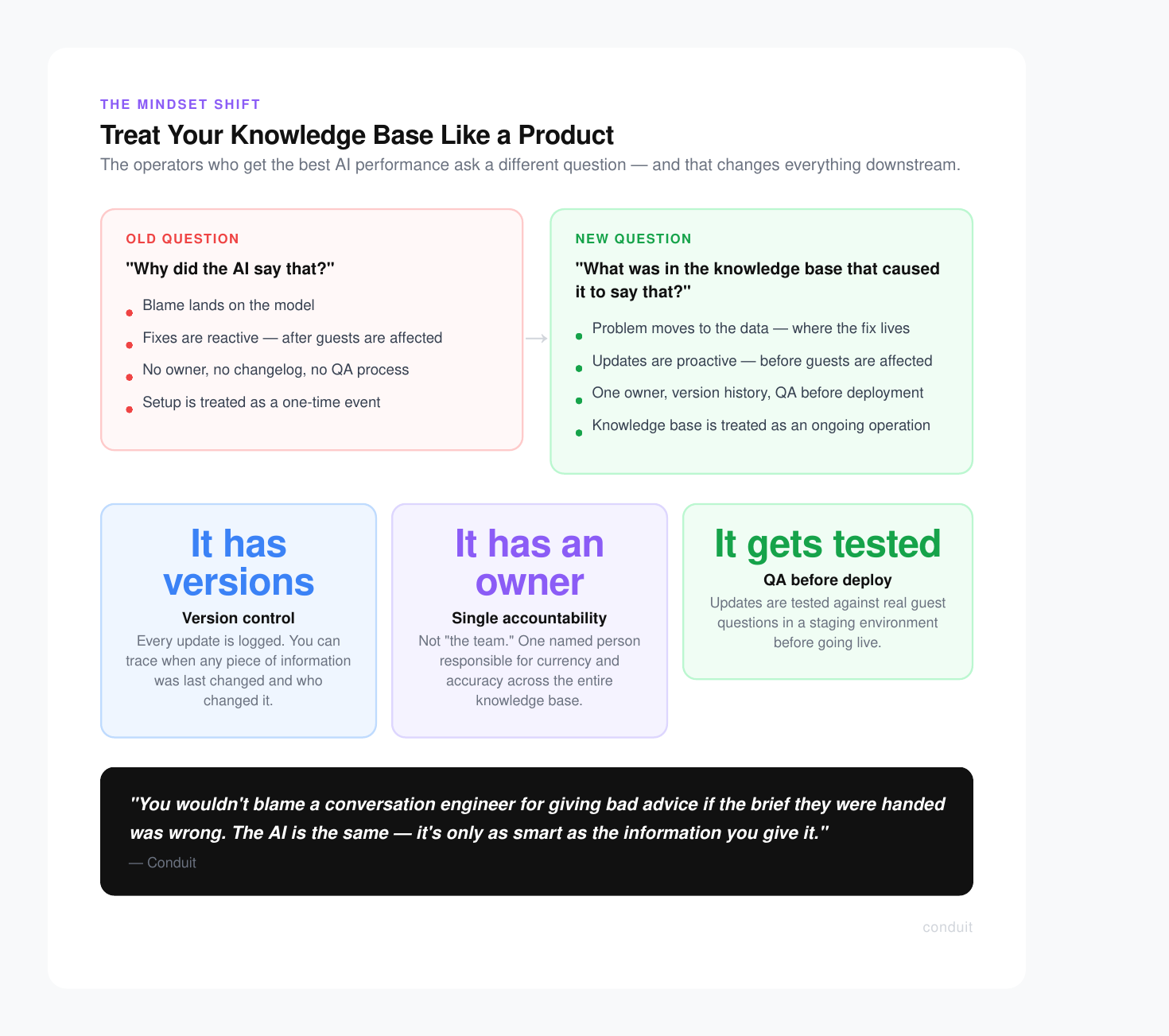
Think of it this way: you wouldn't blame a conversation engineer for giving bad advice if the brief they were handed was wrong. The AI is the same. It's only as smart as the information you give it.
"AI is only as good as the information you give it. The best operators maintain their knowledge base, version it, and QA it regularly."
This is also why a knowledge base alone isn't enough. The architecture around how your AI accesses, prioritizes, and updates that information matters just as much as the content itself.
The Knowledge Base Audit Checklist
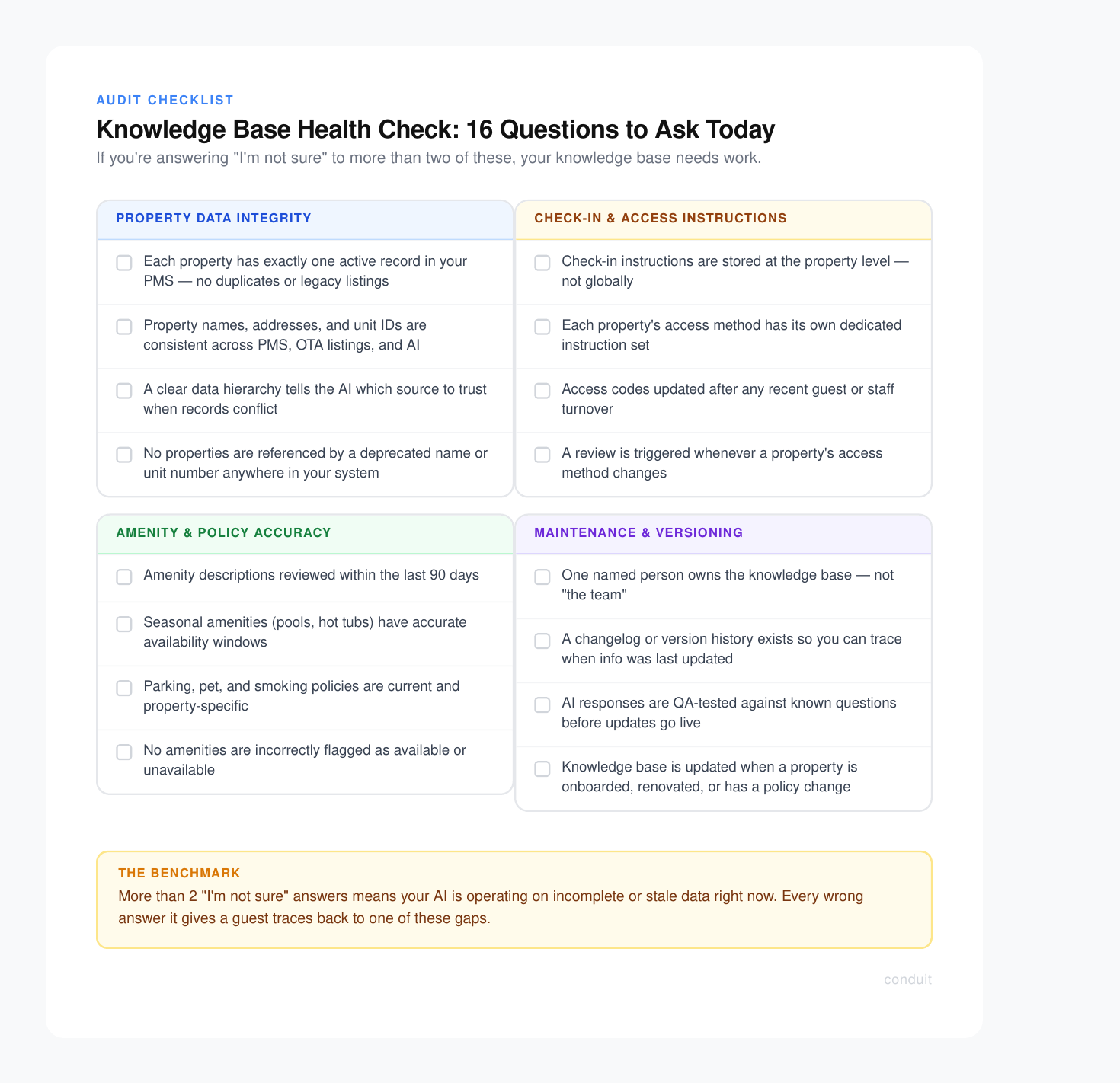
Run through this before your next AI review. If you're answering "I'm not sure" to more than two of these, your knowledge base needs work.
Property Data Integrity
- Does each property have exactly one active record in your PMS, with no duplicate or legacy listings?
- Are property names, addresses, and unit identifiers consistent across your PMS, OTA listings, and AI knowledge base?
- Is there a clear data hierarchy that tells the AI which source to trust when records conflict?
Amenity and Policy Accuracy
- Have amenity descriptions been reviewed in the last 90 days?
- Do seasonal amenities (pools, hot tubs, outdoor spaces) have accurate availability windows?
- Are parking, pet, and smoking policies current and property-specific?
- Are any amenities flagged as "temporarily unavailable" that should now be marked active, or vice versa?
Check-In and Access Instructions
- Are check-in instructions stored at the property level, not globally?
- Does each property's access method (lockbox, smart lock, front desk) have its own instruction set?
- Have access codes and door codes been updated after any recent guest or staff turnover?
- Is there a review trigger when a property's access method changes?
Maintenance and Versioning
- Does someone own the knowledge base? (Not "the team." One person.)
- Is there a changelog or version history so you can trace when information was last updated?
- Do you have a QA process where you test AI responses against known questions before deploying updates?
- Is there a trigger to update the knowledge base when a property is onboarded, renovated, or has a policy change?
How Conduit Helps
Most operators we work with aren't struggling because they chose the wrong AI. They're struggling because nobody told them the knowledge base was the product. Conduit is built to fix that.
When you connect your PMS to Conduit, the platform doesn't just ingest your data and hope for the best. It actively surfaces conflicts, flags gaps, and keeps your AI working from a single source of truth across every property in your portfolio.
Here's what that looks like in practice:
- Property-level knowledge scoping : Instructions, amenities, and policies live at the property level, not globally. The AI physically cannot serve a guest at Property A the check-in flow for Property B.
- PMS conflict detection : When a sync creates duplicate or conflicting records, Conduit flags it for human review instead of silently picking the wrong one.
- Knowledge update triggers : When a property changes in your PMS, a new season starts, or a guest flags a bad response, Conduit prompts your team to review the relevant entries before the next guest asks.
- QA testing workflows : Push a knowledge base update and run test conversations against it before it goes live. Catch errors in staging, not in a guest's inbox.
Operators using Conduit stop playing whack-a-mole with AI errors. Instead of diagnosing wrong answers after the fact, they maintain the knowledge base proactively and the AI performs accordingly.
The model isn 't your bottleneck. Your data is. Conduit gives you the infrastructure to fix that permanently, not just patch it.
Book a demo and we'll audit your current knowledge base setup together. Most operators find at least two or three critical gaps in the first session.
Stay in the loop
Get the latest on AI automation, product updates, and customer stories.


