February 20, 2026

We're excited to share this week's updates — featuring smarter agent scheduling, deeper PMS integrations, and a batch of quality improvements across the platform.

Enhanced Capabilities

Widget Customization & Call Transfers

Three improvements to give you more control over the widget experience. Each route option can now display its own custom post-form message, so users see confirmation text tailored to what they selected. Links inside the widget automatically append collected form data and UTM parameters — no manual URL building needed. And call transfers now show clear "Transfer Succeeded" or "Transfer Failed" status pills instead of a generic badge, so your team can see outcomes at a glance.

Faster New Conversation Flow

Starting a new conversation in the widget now takes you straight to the chat view with an instant greeting message, instead of showing a loading screen while things spin up.

Opera HMS Listing Enrichment

Opera-connected listings are now automatically enriched with room types, amenities, restaurants, attractions, transportation, and directions — giving your AI agents much richer context for answering property-specific questions.

Escalation Center Improvements

Filter escalations to just the last 24 hours for quick daily review. Escalations now appear in the All Topics view, chat type filtering works correctly, and the topic volume chart shows more data at a glance.

Live Automation Rate

The automation rate display now shows your current live rate instead of a rolling average, giving you a more accurate picture of how your AI is performing right now.

Smarter Agent Scheduling

Agent selection now uses a least-loaded algorithm — agents with fewer active bookings get priority instead of random assignment. Schedule boundaries are enforced so agents can't be booked outside their availability, and scheduled workflows now scan all contacts without a cap.

Multi-Select Workflow Filters

Workflow group conditions now support multi-select with contains/not-contains operators, letting you build more precise audience targeting. Manual workflow runs are capped at 100 contacts to prevent accidental mass actions.

Search Improvements

Booking request status now appears in search results with a "belongs to contact" field for better context. Availability results no longer count checkout dates as conflicts, and search now works correctly for workspaces with more than 100 listings.

Performance & Quality Improvements

  • VRBO Messages: Eliminated duplicate message deliveries and fixed message body rendering for VRBO conversations.
  • Guesty Custom Fields: Fixed a sync issue where rate-limited API calls were silently dropping custom field data on reservations.
  • Outlook Emails: Sent emails no longer show empty body when the thread contains Outlook replies.
  • Sent-by-Users Filter: The sidebar filter now correctly shows only human-sent messages, excluding AI and workflow-generated messages.
  • Chart Rendering: Fixed overlapping fills on area charts and corrected event time bucketing.
  • Schedule Timezones: Scheduled workflows now trigger at the correct local time regardless of timezone.
  • Template Variables: Fixed broken WhatsApp and SMS template variables that were producing garbled output.
  • Contact Name Fallback: Reservation data is now refetched when the webhook payload is missing the contact name.
  • Booking Request Links: Action buttons on Hostaway booking requests now link directly to the reservation in your PMS dashboard.
  • Onboarding: New workspaces now must select an industry type during setup, closing a bypass bug.
  • Upgrade Fallback: When self-service upgrade fails, you now see a "Contact Sales" option instead of a dead end.

Designed, Built, and Written By
Mathias
Marketing
Punn Kam
CTO & Co-Founder
Will Garman
Full Stack Engineer
Yash
Engineer
Bohdan
Engineer
February 13, 2026

Major Features

Chat Widget Overhaul – Conversation History, Anonymous Mode, and Redesigned UI

The embeddable chat widget has been rebuilt from the ground up. Returning visitors now see their full conversation history — a scrollable list of past chats with a "New conversation" option to start fresh.

Two new identity modes give you more control over how guests interact:

  • Identity passthrough: Pass user identity via window.ConduitSettings (email, phone) to skip the contact form entirely for logged-in users
  • Anonymous mode: Enable form-free chat sessions when you don't need contact details upfront

The UI has been redesigned with modern message bubbles, timestamp grouping, brand icons, and scroll-aware headers. The widget also now correctly shows an escalation notice when AI is paused (replacing the old perpetual "thinking" spinner), and guests can send follow-up messages while AI is still processing.

Enhanced Capabilities

Knowledge Base Import Now Supports Listing Groups

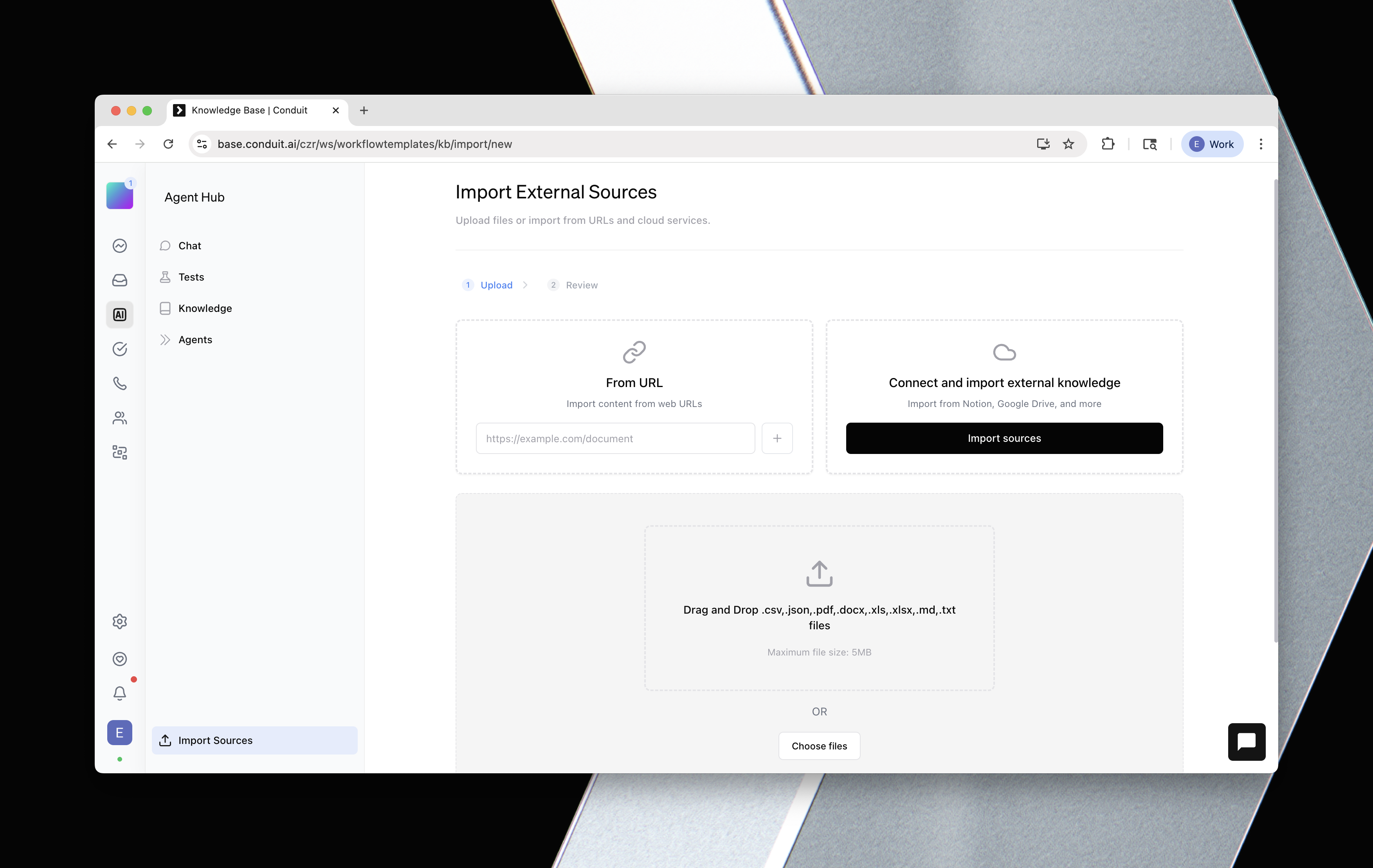
When importing structured data (CSV or Notion databases) into the knowledge base, you can now map a column to Group Name or Group ID to scope rows to listing groups — not just individual listings. This makes bulk imports much more flexible for workspaces that organize properties into groups.

Insights Dashboard: Custom Attribute Charts

The insights dashboard now supports charting boolean and numeric custom attributes, giving you new ways to visualize your data beyond the built-in fields.

Booking Notifications Include Assignee Name

Email notifications for new bookings now include the name of the assigned team member, so you can see who's handling each reservation at a glance.

Batched Workflow Failure Notifications

When a workflow fails across multiple contacts, you now receive a single batched notification instead of individual alerts for each failure.

Inbox Search Preserves Relevance Order

Search results in the inbox now maintain their relevance ranking instead of being re-sorted by timestamp. The most relevant conversations appear first.

Performance & Quality Improvements

  • AI greeting responses: AI on autopilot now correctly replies to initial greetings and farewells instead of suppressing them
  • AI acknowledgment handling: The AI now distinguishes between a contact's first acknowledgment (which gets a reply) and repeated ones (which don't)
  • Internal note handling: AI no longer sends responses when internal notes are added to a conversation
  • Booking timezone accuracy: Fixed an issue where bookings could be created 1 hour off due to daylight saving time conversion
  • Dashboard charts: Fixed an issue where dashboard charts rendered blank (axes visible, no data)
  • Lodgify messages: Fixed duplicate messages appearing for Lodgify workspaces and resolved false "Unable to send" errors on delivered messages
  • Label conditions: Labels with empty condition groups in an OR block no longer incorrectly match all contacts
  • Booking.com reply routing: Replies to Booking.com messages now correctly route through the proxy address instead of exposing the team member's personal email
  • Email rendering: Incoming emails with raw angle-bracket addresses no longer crash the message viewer
  • AI workflow builder: Fixed a crash that occurred after selecting an inbox in the AI workflow builder
  • Knowledge base sync: Notion sources with unsupported block types (e.g., embedded databases) no longer crash the sync — unsupported blocks are skipped gracefully
  • Workflow listing group filter: Listing group filter nodes now check all groups a listing belongs to, not just the first one
  • Multi-PMS listing sync: Manual listing sync now processes all connected integrations instead of only the first one
  • MEWS listing import: Properties with 28+ room types no longer fail to import
  • Voice agent deletion: Deleting voice agents no longer fails with "Not Found" errors
  • Contact detail panel: Switching between contacts now properly resets the detail panel tabs
  • Call insights export: The exported CSV for incoming/outgoing calls now matches the graphs on the insights page
  • Booking search tool: Fixed checkout date and property ID issues in the availability search tool

Designed, Built, and Written By
Mathias
Marketing
Punn Kam
CTO & Co-Founder
Will Garman
Full Stack Engineer
Cristian
Engineer
Yash
Engineer
February 6, 2026

Major Features

Slack Triage Buttons Mode – Route conversations with one click

Workflows now support a "Buttons Mode" for the Slack Triage step. Instead of relying on AI-driven responses, you can present configurable buttons that route conversations down different branches. Button labels and styles (green, red, gray) are fully customizable, giving teams a fast, manual-decision workflow right from Slack.

Enhanced Capabilities

Resolution Rate Metric

The Trends dashboard now shows a resolution rate metric when viewing an inbox type that has auto-mark-as-done enabled. See how effectively conversations are being resolved alongside the existing automation rate.

Dashboard Comparison Periods

Escalation volume trend charts and message volume explorers (incoming, outgoing, all) now support comparison periods — see how this week's numbers stack up against the previous period.

Gmail Re-authentication Banner

A global banner now appears when connected Gmail accounts need re-authentication, linking directly to email settings to reconnect. Hidden on mobile for a cleaner experience.

Inactive Listing Indicator

The booking sidebar now displays an "Inactive" badge on listings that aren't receiving AI responses, with a tooltip explaining why.

Phone Number Formatting

The outbound call modal now formats phone numbers with proper country codes and international formatting, with automatic country detection based on locale.

Simplified Voice Settings

The voice configuration page has been streamlined — a single voice picker now works for all languages, keeping the "Multilingual" option in the language dropdown.

SiteMinder Booking Channel Support

Reservations from SiteMinder are now recognized as a distinct booking channel with a proper icon in the inbox.

Workflow Run Details: Contact Info on Trigger Logs

The workflow trigger log now shows the contact's name and avatar when viewing run details, making it easier to trace which contact triggered a specific run.

Performance & Quality Improvements

Workflows

  • Workflows now use the specific booking that triggered them instead of picking the most recent, fixing timing bugs on rapid bookings
  • Send Webhook nodes now correctly resolve booking variables from trigger context instead of returning null
  • Contacts are processed in batches to prevent failures on large schedules
  • Index-based lookups replace full scans for custom attribute filtering — significantly faster on large contact lists
  • Schedule Workflow dialog now shows true/false dropdowns for checkbox attributes instead of a broken text input
  • New reservation workflows trigger correctly from Passthekeys message webhooks

AI & Conversations

  • AI no longer marks a conversation as "done" when there are still pending messages in the buffer
  • Conversations in follow-up no longer move to To Do early when the follow-up time is changed
  • Inquiry-first Airbnb conversations now resolve correctly via thread ID fallback

Email

  • Emails are blocked from sending when a contact has no email address, preventing silent failures
  • Emails where a mobile signature appears before the actual content no longer lose the message body
  • Incoming emails with a Reply-To header now use that address for contact creation instead of From

Integrations & PMS

  • Lodgify sent messages no longer briefly show "Unable to send message" in the UI
  • Manual listing sync now processes all integrations when a workspace has multiple PMS connections of the same type
  • Airbnb alteration request comparison card now uses gross price for both current and proposed payouts
  • Same-day departure reservations on platforms like Cloudbeds now correctly trigger workflows
  • Guesty approve/decline/pre-approve operations now accept all 2xx responses instead of only 200
  • Krossbooking listings with null addresses no longer fail to import silently
  • "Last synced" timestamp now pulls from integration sync time instead of showing "Not found"
  • Hostfully message bodies now display as plain text instead of raw HTML
  • Streamline listings without IDs are filtered out before import instead of causing failures
  • Mews PMS icon now renders correctly

Dashboard & UI

  • Escalation center stat cards and list queries now show more accurate, real-time data
  • Approving, editing, or rejecting AI responses from the inbox now updates the corresponding escalation record
  • Widget session dropdown now shows all sessions for a contact instead of deduplicating
  • Voice greeting configuration now appears for existing voice agents, not just new ones
  • Team members can now assign conversations without needing the ViewContacts permission

Designed, Built, and Written By
Mathias
Marketing
Punn Kam
CTO & Co-Founder
Will Garman
Full Stack Engineer
Cristian
Engineer
Yash
Engineer
January 30, 2026

Enhanced Capabilities

Receive All Booking Notifications

Team members can now opt in to receive notifications for all bookings across the workspace, not just ones assigned to them. A new "Receive all bookings" preference is available in notification settings.

Alteration Request Comparison View

When reviewing Airbnb alteration requests, the inbox now shows a side-by-side comparison table of the original vs. proposed booking details — making it easier to evaluate changes at a glance.

Phone Number Alias in Chat

The chat input now displays the phone number's friendly alias instead of the raw number, making it clearer which line you're sending from.

Funnel Transfer Condition

The value dashboard funnel builder now supports a "Transfer" condition type, letting you track handoffs in your funnel analysis.

Contact Fields in Workflow Variable Picker

Email, Phone, and WhatsApp fields are now available in the workflow variable picker for contact-related steps.

Mews Webhook URL Display

The Mews integration settings page now displays the webhook URL, so you can easily copy it during setup.

Performance & Quality Improvements

  • Email delivery: Fixed an issue where emails could be sent to the wrong recipient when composing new messages
  • Email rendering: Fixed emails not displaying when the message only contains HTML with no plain text body
  • Email rendering: Fixed plain-text-only emails not rendering in the inbox
  • AI labels: Fixed auto-labeling conditions not matching reservation statuses due to case sensitivity
  • AI translation: Fixed translated responses not being used correctly in the escalation path for Copilot mode
  • Airbnb sync: Fixed conversation webhooks overwriting check-in/check-out times on reservations
  • Airbnb sync: Fixed webhook crashes when the conversation users array is missing
  • Airbnb reservations: Fixed incorrect reservation selection on checkout day and for Airbnb Core bookings
  • KrossBooking: Fixed "Booking Engine" channel incorrectly mapping to Booking.com instead of Direct
  • Guesty messaging: Fixed message delivery status incorrectly showing as failed
  • WhatsApp: Fixed voice call routing for voicemail and fallback scenarios
  • Integrations: Fixed soft-deleted integrations not reactivating on reconnect
  • Gmail: Fixed inability to remove Gmail accounts with expired authentication
  • Escalation center: Dismissing escalations now updates instantly without waiting for a server round-trip
  • Inbox permissions: Users can now view inbox members without needing the ManageInbox permission
  • Booking notifications: Appointment notifications are now sent only to the assigned agent, not all workspace members
  • AI tools: Added validation to check tool availability before execution, preventing errors from misconfigured tools
  • SMS compliance: Fixed A2P campaign approval flag being set before verification is complete
  • Error messages: Improved error messaging when SMS messages exceed size limits

Designed, Built, and Written By
Mathias
Marketing
Will Garman
Full Stack Engineer
Punn Kam
CTO & Co-Founder
Bohdan
Engineer

Cristian
Engineer
January 23, 2026
Major Features

Opera HMS Integration – Sync Your Oracle Property Management Data

Connect your Oracle Opera HMS directly to Conduit. Reservations, guest data, and listings now sync automatically from your Opera property management system, keeping your AI agents informed with real-time property information.

Enhanced Capabilities

AI Response Ratings: New thumbs up/down buttons in the agent sidebar let you rate AI-generated responses. Your feedback helps improve AI quality over time.

Unlimited Airbnb Connections: Connect as many Airbnb accounts as you need. The previous workspace connection limit has been removed.

Facebook Messenger in Routing Rules: Route Messenger conversations using your existing routing rules. Facebook Messenger now appears as a channel option alongside SMS, email, and other channels.

Performance & Quality Improvements

AI Greetings: Fixed wrong time-of-day greetings (e.g., "Good morning" at 9 PM) by adding timezone context to AI responses.

AI Translations: Autopilot messages now translate correctly when sent automatically.

SMS Delivery: Invalid phone numbers and landlines now show helpful messages instead of generic failures.

Cloudbeds Links: Fixed "Open in PMS" link for Cloudbeds reservations.

Lodgify Messages: Fixed duplicate message handling from webhook retries.

Dashboard Charts: Fixed area charts showing incorrect stacked values.

Knowledge Modal: Dropdown now closes properly when selecting a group or listing.

Workflow Saves: Fixed "Delete on nonexistent document" error when saving workflows with custom code steps.

Designed, Built, and Written By
Mathias
Marketing
Will Garman
Full Stack Engineer
Yash
Engineer
Cristian
Engineer
Punn Kam
CTO & Co-Founder
January 16, 2026
Major Features

Multi-PMS Support – Connect Multiple Property Management Systems

Workspaces can now connect multiple PMS instances simultaneously. This enables teams who use different PMS platforms across their portfolio to manage everything from a single Conduit workspace, no more switching between systems or maintaining separate configurations.

Widget Form Trigger – Automate Workflows on Form Submissions

New workflow trigger that fires when someone submits a form through your website widget. Create automated follow-up sequences, route leads to team members, or kick off custom workflows based on form submissions.

Instagram & Messenger Account Filtering – Filter Inbox by Connected Account

Workspaces with multiple Instagram or Messenger accounts can now filter their inbox by specific account. The connected channels sidebar shows all linked accounts with filtering options, making it easy to focus on conversations from a specific source.

Multiple Booking.com Emails – Process Messages from Multiple Addresses

Connect multiple Booking.com sender emails to a single workspace. Useful for teams with separate Booking.com accounts that need unified message handling.

Enhanced Capabilities

Escalation Center Performance

The escalation center now loads significantly faster for large date ranges. Queries that previously timed out now return in seconds.

Start from Scratch Agent Template

Both chat and voice agent creation now include a "Start from scratch" option as the first template choice. Build agents from a clean slate without inheriting any defaults.

Booking Request Inbox Filter

New "Booking Request" status filter in the inbox sidebar. Quickly find conversations associated with booking inquiries.

Confirmation Code in Sidebar

Reservation confirmation codes now display in the booking sidebar for quick reference.

Sublisting Count Column

The listings table now shows a sublisting count column for accounts with multiple units.

Follow-up "Tomorrow" Defaults to 8 AM

When scheduling a follow-up for "tomorrow," the time now defaults to 8 AM instead of the current time.

Performance & Quality Improvements
  • Guesty attachments: Sent images and invoices now display correctly in the inbox.
  • HTML message rendering: Style tags stripped to prevent layout issues.
  • Agent injection workflows: Fixed workflows getting stuck when optional fields aren't extracted.
  • Custom code output: JSON output now properly serialized in Python runtime.
  • Workflow auto-save: Step configurations save automatically when clicking away.
  • Auto-mark as done: Respects autopilot setting before resolving conversations.
  • Airbnb workflows: Reservation triggers now fire correctly for Airbnb-only workspaces.
  • Voice escalations: Transcripts and recordings now load in the escalation center.
  • MCP server parsing: Fixed SSE response parsing for authenticated MCP servers.
  • Contact email sync: Email channel nodes created regardless of Postmark configuration.
  • Twilio errors: Landline validation errors handled gracefully.
  • PMS messages: HTML body preserved for rich email content display.

Designed, Built, and Written By
Mathias
Marketing
Will Garman
Full Stack Engineer
Cristian
Engineer
Yash
Engineer
Punn Kam
CTO & Co-Founder
January 9, 2026
Major Features

Mobile Call Bridge – Make Calls From Your Workspace Number
Your team can now make outbound calls from their personal phones while displaying your workspace phone number as the caller ID. Call into the system from your mobile, enter the customer's number, and the call bridges through, perfect for on-the-go team members who need to reach customers without revealing personal numbers.

Multi-Workspace Billing
Enterprise accounts can now manage multiple workspaces under a single billing order. Track usage across all your properties in one place, with clear visibility into how each workspace contributes to your overall credit consumption.

Faster Workflow Building
Skip the wait. When you create a new workflow, you're dropped directly into the editor where you can start building immediately with AI assistance. Describe what you want to automate and watch it take shape in real-time, no more waiting for generation to complete before you can make changes.

Enhanced Capabilities

Topic Message Exclusion: Improve your conversation intelligence by removing misclassified messages from topics. When a message doesn't belong, exclude it and the system automatically adjusts to provide more accurate insights.

Guesty Channel-Specific Information: Your AI now knows the difference between your Airbnb cancellation policy and your VRBO cancellation policy. Listings imported from Guesty include per-channel details, so customers get accurate answers regardless of which platform they booked through.

Contact-Level Labels: Labels now follow your customers across all their interactions. When a repeat customer returns, their labels (VIP, High Maintenance, etc.) automatically appear—no need to re-label each transaction.

Audio Settings Remember Your Preferences: Your phone microphone and speaker selections are now saved. Start a new session and your preferred audio devices are already configured.

Channel Filters: Quickly focus on customers from specific platforms. Filter your inbox by Airbnb, VRBO, Direct, and more.

Mark as Done from Follow-Up: Clear follow-up items faster. Conversations in follow-up status now show a "Mark as done" button right in the chat window.

Performance & Quality Improvements
  • Initial OTA Message Handling - Fixed
  • Past-Due Payment Messaging - Fixed
  • Auto-Label Inbox Matching - Fixed
  • Mobile Call Bridge Speed - Improved
  • Email Formatting Preservation - Fixed

Designed, Built, and Written By
Mathias
Marketing
January 5, 2026

We're excited to share the latest improvements to Conduit AI, featuring key fixes and performance enhancements that make your AI agents more reliable and your workflows smoother.

Performance & Quality Improvements

  • Topic Discovery Performance: Significantly optimized query performance for faster page loads, ensuring you can explore conversation patterns and insights without delay.
  • Reservation Accuracy: Enhanced AI logic now correctly identifies which specific reservation a guest is referring to when they have multiple bookings, eliminating confusion and improving response accuracy.
  • Notion Auto-Sync: Resolved issue where the 24-hour automatic Notion sync wasn't updating, ensuring your knowledge base stays current with the latest information.
  • Gap Night Upsells: Fixed pre-stay gap night offers to prevent triggering for past dates on same-day bookings, ensuring upsell logic remains accurate and timely.
  • Mobile Call Answering: Conference calls can now be answered on mobile devices—previously unresponsive button is now fully functional.
  • Inbox Notes on Mobile: Send button now visible on mobile Safari when composing notes, restoring full functionality on iOS devices.
  • Email Display Fix: Emails with fixed-width templates (like Plum Guide) now display correctly without content cutoff.
  • Slack Webhook Security: Added signature verification for incoming Slack webhooks, strengthening integration security and preventing unauthorized access.

Designed, Built, and Written By
Mathias
Marketing
December 29, 2025
Major Features

Topics Explorer – Automatic Conversation Intelligence

Gain unprecedented visibility into your customer conversations. Conduit AI now automatically organizes every conversation into Topics and Subtopics, revealing patterns and insights that were previously invisible. See exactly what's driving support volume, identify quality issues before they escalate, and understand your customers at a depth manual analysis could never achieve. No more guessing—just clear, actionable intelligence from thousands of conversations.

Agentic Sidebar – AI-Powered Agent Editing

Building and editing AI agents just got dramatically simpler. You can now modify workflows, chat agents, and voice agents through natural conversation with AI—no more digging through complex prompts or navigating node-by-node through large workflows. Just describe what you want to change, and the AI handles the technical implementation.

Escalation Center

Take control of your AI agent performance with our new Escalation Center. Review and resolve conversations escalated from both chat and voice agents directly within the AI Agent Hub. Voice escalations (newly added) help you quickly identify knowledge gaps, prompting issues, and tool configuration needs in your voice agents, making continuous improvement straightforward and actionable.


Enhanced Capabilities

Multi-Lingual Custom Voices

Your voice agents can now use cloned voices or ElevenLabs community voices across all supported languages, enabling truly personalized guest experiences in any language.

Call Forwarding Confirmation

Added confirmation screens for forwarded calls to prevent issues with Apple call screening and Do Not Disturb settings. Recipients must press "1" to accept the forwarded call, ensuring calls reach live team members instead of dropping to voicemail.

Agent Permissions

Administrators now have granular control over workspace member access. Set specific permissions to determine who can view the agents page and manage chat and voice agents, giving you better security and team management.


Performance & Quality Improvements
  • Chat Performance Enhancement: Resolved lag issues in long conversations reported by customers. The chat input now maintains smooth performance regardless of conversation length.
  • Listing Group Variables: Workflows can now include listing group names in messages, enabling more natural guest communication. For example, say "Enjoy your stay at Hilton Miami" instead of referencing individual room numbers.
  • Improved Tool Error Handling: Enhanced logging provides detailed visibility into tool failures, making troubleshooting faster and more effective.
  • Billing Infrastructure: Moved to an entitlements-based system with Salesbricks integration for streamlined billing management.
  • Organization Chart Exports: Easily export organizational structure data for reporting and analysis.

Designed, Built, and Written By
Mathias
Marketing
December 20, 2025

This week marked the end of our Winter 2025 Advent Calendar. We have officially unboxed all 10 days, releasing a powerful suite of functionalities designed to transform how you work.

Here is a recap of the final 5 game-changing features we released to wrap up the event:

  • End-to-End Workflows: Your AI agents now manage the relationship from start to finish. If a customer doesn't respond or plans change, the system adapts, follows up, and reroutes to ensure nothing falls through the cracks.
  • Escalation Center: A dedicated center for managing critical issues.
  • Agentic Sidebar: Stop hunting through settings—just talk to your sidebar. You can ask questions in plain English or describe what you want, and the system will answer you or build the workflow for you.
  • Scheduled Workflows: Run processes at scale without the stress. You can now break workflows into manageable batches that run automatically over time, allowing you to control credit usage and execution speed.
  • Topics Explorer: AI now automatically organizes every customer conversation into Topics and Subtopics, letting you see exactly what is driving support volume and identify quality issues at a glance.

To have a full recap of the release and learn more about each new functionality, visit your dedicated launch week page.

Designed, Built, and Written By
Mathias
Marketing
December 12, 2025

This week marked the launch of our Winter 2025 Advent Calendar edition. During 10 days, we will release 10 great functionalities. If you are not yet a member of our mailing list, this is a great opportunity to join.

Mid-Advent calendar pit stop, here is a recap of the 5 game-changing features we released:

  • Workflows Integrations: Connect your favorite platforms and watch as information flows automatically both ways. You were able to connect Notion; you are now able to connect even more tools.
  • Instagram DM in your inbox: Your unified inbox now includes Instagram. Because when a potential customer slides into your DMs with a question or a booking inquiry, you need to be ready, not scrambling between apps.
  • Agent Packs: Pre-built templates for the most common use cases, created by your peers and industry experts. No more staring at an empty workflow wondering where to begin.
  • Workspaces & Organizations: One control center that sits above all your workspaces. Manage multiple brands, teams, and members from a single view.
  • Value Attribution: We are moving beyond blind guesses. You can now tie a specific monetary value to your automation. By using your own key levers, Conduit now calculates the actual money your AI agents are saving the business.

To have a full recap of the release and learn more about each new functionality, check the following link.

Designed, Built, and Written By
Mathias
Marketing
December 5, 2025

Here are the main things that we worked on this week:

  • Shopify: Implemented orders/create and orders/updated triggers post-app approval, enabling real-time email notifications for new orders and updates. Merchants now receive automated confirmations, status changes, and fulfillment alerts directly via integrated email workflows.
  • Google Drive: Expanded Google Sheets integration with multi‑page (multi‑sheet/tab) support, allowing the agent to query, write, and update data across several sheets within the same document for richer reporting and automations.
  • WebHook: Webhook triggers now buffer the last 10 received events, so the agent can safely process recent activity without needing a live listener connected at all times. This reduces the risk of missed events and simplifies integration.
  • UX improvement: Refined the workspace selection flow in Org Insights and the UI for importing knowledge into multiple listings, making navigation and configuration much faster. These UX updates reduce time spent managing workspaces and content, so teams can focus more on analysis and less on setup.

Designed, Built, and Written By
Mathias
Marketing
September 5, 2025
Dashboard Updates and AI Tools

We’ve added new Dashboards and workflow tools to track analytics about your humans and AI.

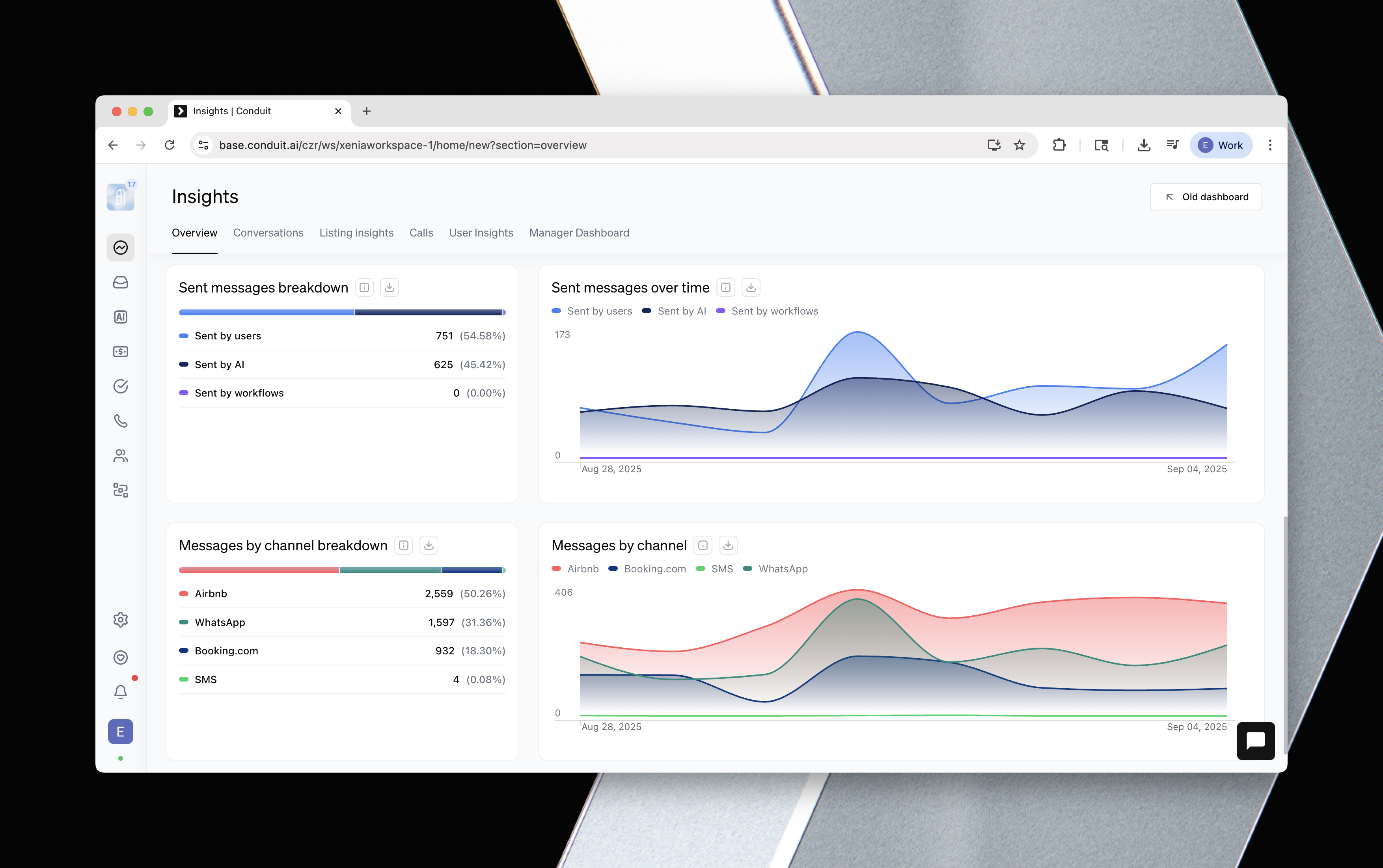
Under Overview, Sent messages breakdown shows messages sent by users, AI, or workflows. You can compare messages sent over time and see the effectiveness of your team and AI.

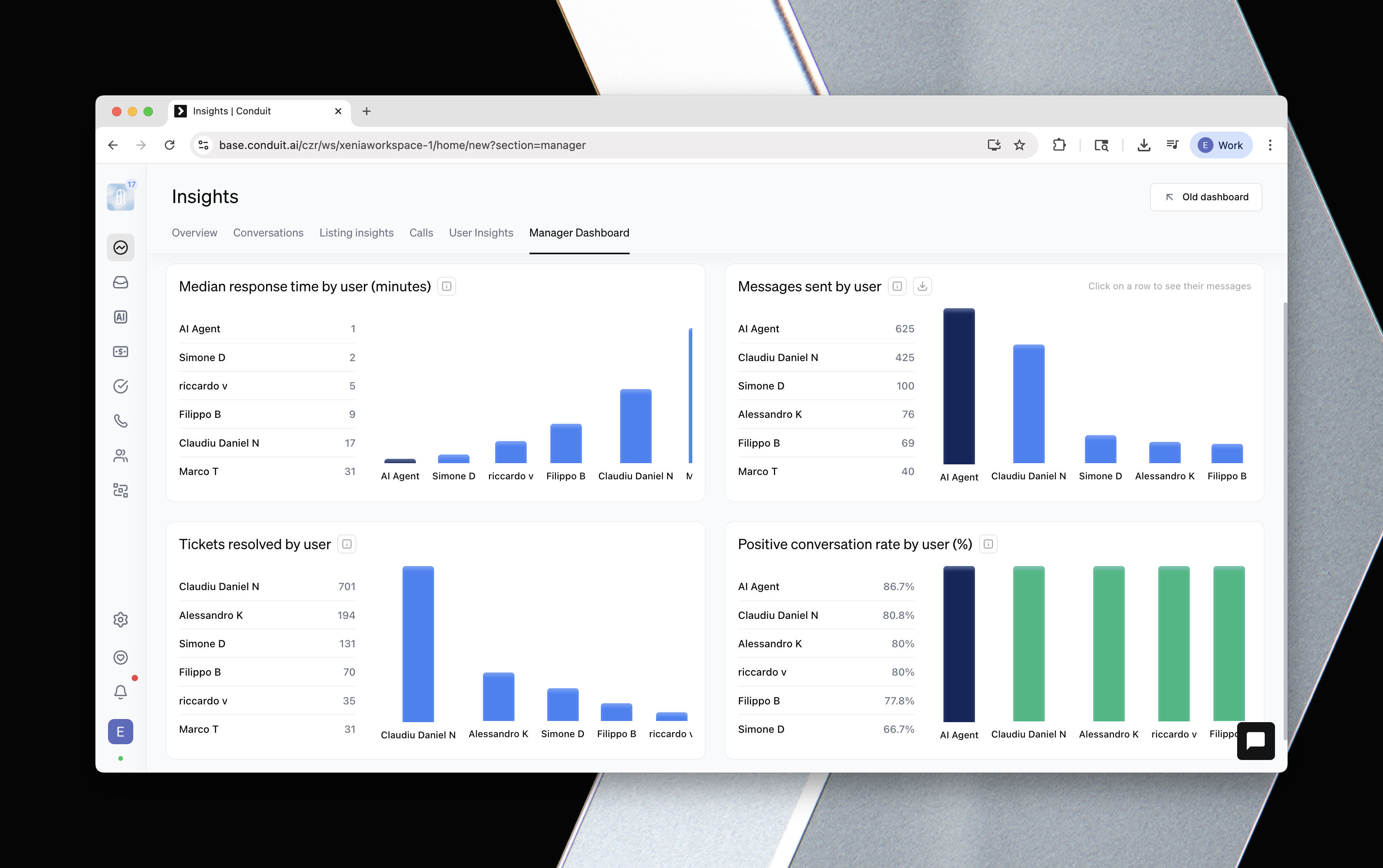
We want to help you ensure every customer has a positive experience. With our new Dashboard Positive conversation rate by user, you can compare results across your team and AI, spot gaps where your team falls short, and take action so your customers are taken care of.

Not only have we been making it easier to track your AI, but we’ve improved the way your team can manage your AI.

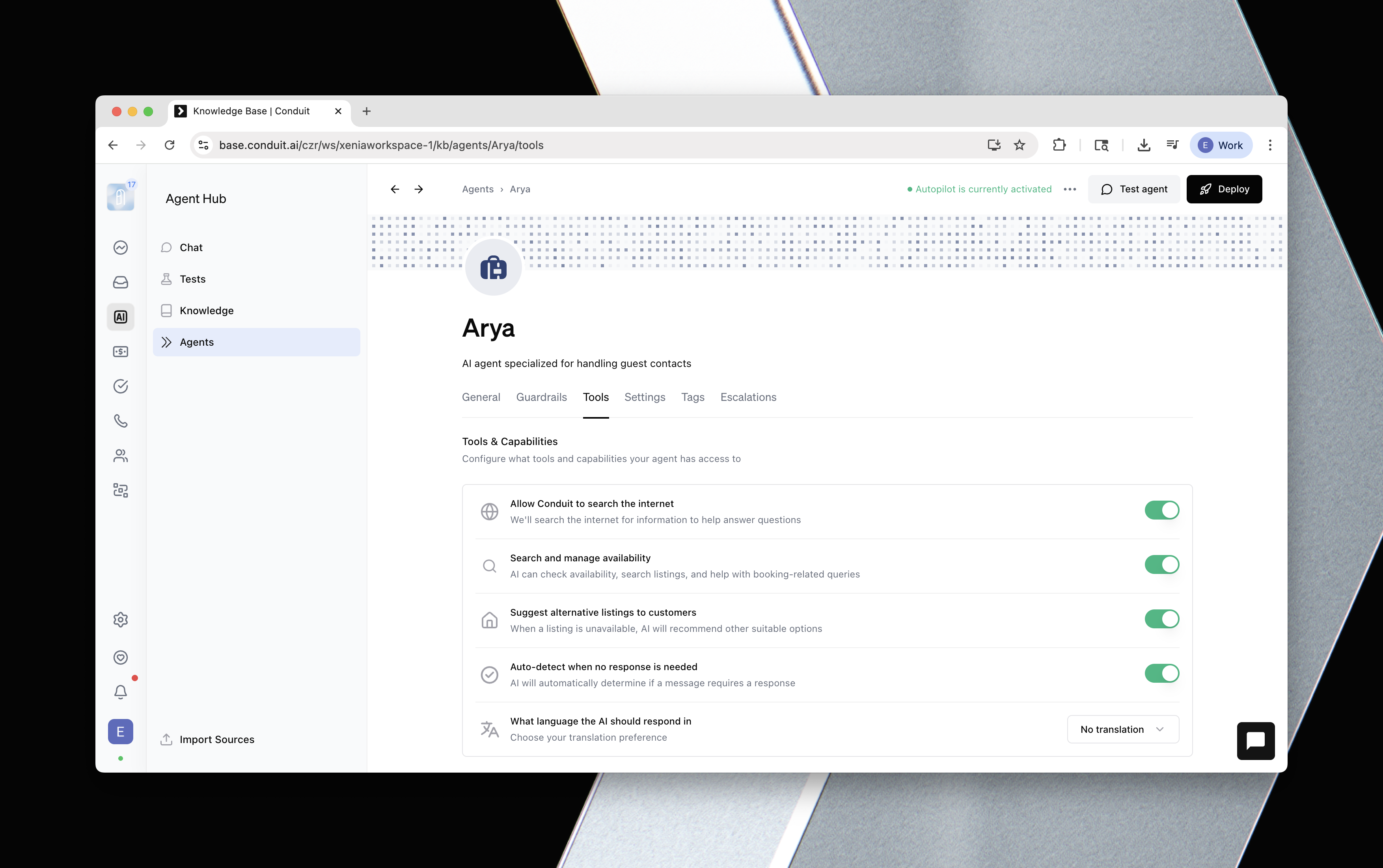
Tools are now in a separate tab, so you can stay organized and have visibility on the tools and capabilities your agent has. Our new workflow node allows you to leave a note and alert your team to follow up after a workflow is complete, ensuring the right people are notified when your AI takes action.

Designed, Built, and Written By
Punn Kam
CTO & Co-Founder
Will Garman
Full Stack Engineer
August 29, 2025
Improvements to Listing, Filtering, Sources

We've made improvements to Conduit to provide better responses to guests and strengthen organization within the platform. These improvements will not only support our hospitality users, but all our customers in making our agents more powerful.

• Listing Tool: The Listing availability tool can accurately provide alternative listings at the day level. This is a backend improvement that will help your AI respond to customer requests.
• Listing Knowledge Filtering: In your Listing Knowledge Base, you can now filter knowledge based on what inbox the information applies to. You will be able to improve your organization in your Knowledge Base and know exactly what listing information applies to each inbox.
• Sources: UX improvements and bug fixes for uploading external sources and connecting channels.

Designed, Built, and Written By
Prathik Malireddy
Engineer
Emily Chau
Agent Product Manager
August 22, 2025
Suggestions, Sources, Tests

We've improved how you teach and train your AI agent.

Your AI shouldn’t be static. It should learn from real conversations, adapt to new knowledge, and give you clear ways to test and guide its behavior. This week’s updates make Conduits more self-improving and transparent, while keeping you fully in control:

  • Suggestions: AI surfaces edits to your knowledge base straight from chat history.
  • Sources Management: A redesigned Sources Hub with Notion, Google Drive, and more, plus flexible syncing, exporting, and importing.
  • Tests: Run bulk test suites and test runs to measure and improve quality before updates go live.
  • Workflow Templates & Executions: Ready-to-use templates and full visibility into execution.

Conduits keeps evolving - not by replacing your work, but by working alongside you, learning and improving every step of the way.

Designed, Built, and Written By
Emily Chau
Agent Product Manager
Prathik Malireddy
Engineer
Lodo Benvenuti
AI Engineer
July 11, 2025

Voice AI

Voice belongs inside the same system that already powers your conversations.

Most voice AI offerings ask you to build something entirely separate - new agent, new infrastructure, new interface.

But with Conduit, there’s no second system. You’re not starting over. You’re just giving your existing AI agent the ability to speak.

It can handle everything from outbound sales calls to fielding inbound support requests. It can hold a conversation, ask follow-ups, escalate when needed, and do it all without leaving your existing workflow. It’s a natural extension of your AI, fully integrated into how you already work.

Conduit VoiceAI. Try demo here. Available by request.

Designed, Built, and Written By
Lodo Benvenuti
AI Engineer
Will Garman
Full Stack Engineer
Punn Kam
CTO & Co-Founder
July 10, 2025

Salesforce Integration

We’ve launched a Salesforce integration (available by request) to bring real-time conversational data into your CRM.

With this integration, you can:

  • Sync contacts both ways
  • Pull key insights from conversations directly into Salesforce
  • Automatically update fields based on what’s said in live chats
  • Trigger Salesforce workflows from customer questions or behavior
  • Enrich and maintain contact records using conversation-level context

Built for both sales and support teams, this is a smarter way to keep your CRM clean, updated, and connected to what your customers are actually saying.

Available by request.

Designed, Built, and Written By
Prathik Malireddy
Engineer
July 9, 2025

Sandbox 2.0

We believe building your AI agent should feel like onboarding a new team member. You talk to them. Share how things work. Give feedback. Make updates as you go.

Last month we released TeachAI in the inbox. Today, we are releasing Sandbox 2.0, a dedicated space for you to collaborate with your AI agent so that it improves itself.

  • Chat with your agent to ask what it knows, spot gaps, or refine procedures.
  • Say what you want changed—the agent finds the right place, proposes the update, and waits for your approval.
  • Works across general knowledge, guardrails, and behavior rules.

This is really powerful because instead of worrying about what goes where or did you do this correctly, your AI will do that heavy lifting for you. It will guide you and decide where the update belongs and suggest the change for you to approve.

Available now as part of Summer Launch Week.

Designed, Built, and Written By
Punn Kam
CTO & Co-Founder
Will Garman
Full Stack Engineer
Lodo Benvenuti
AI Engineer
July 8, 2025

Blue Text Added

We’ve added support for iMessage to our SMS messaging channel.

When you message an iPhone number, we’ll automatically use iMessage when available. That means better deliverability, faster message speed, and a more native experience for your customers.

iMessage and SMS now live side-by-side in your inbox — no setup required.

Designed, Built, and Written By
Prize Lerthirunvibul
Founding Engineer
July 7, 2025

Build Workflows in Natural Language

Building workflows just got way easier. Introducing a natural language interface that turns your plain-English requests into automated workflows—no code or setup required. Just type what you'd like to automate and go. Now you can describe what you want your workflow to do in plain English, and our AI will generate the entire workflow for you.

No more starting from scratch or trying to figure out complex logic flows. Just tell us "I want to send a follow-up message 2 hours after check-in" and we'll build it for you.

Advanced Workflow Tools & Variables

We've added several powerful new workflow capabilities:

  • Extract Info Node: Pull specific information from guest messages and turn them into variables you can use throughout your workflows
  • Smart URL Variables: HTTP request nodes now support smart variables in URLs, making API integrations much more flexible
  • Recent Messages Variable: Access the conversation history as a variable in your workflows
  • Message Buffer Variables: Use the actual message content as variables in your workflow logic
  • New Contact Trigger: Automatically kick off workflows when new contacts are created

Improvements

  • Smarter Phone Agent Logic: Phone agents now properly end calls when guests hang up, and you can configure how many callback attempts to make for missed calls
  • Day-Level Availability Checking: The listing availability tool now works at the day level instead of just booking periods, giving guests more accurate availability information even when minimum night stays apply
  • Better Phone Number Parsing: We've improved how the system handles and formats phone numbers across different regions and formats
  • Auto-Generated Descriptions: When you create conversation tags, labels, or saved replies, we'll automatically generate helpful descriptions based on the title to keep your team organized
  • Enhanced AI Tracing: Better monitoring and evaluation of AI responses with improved Langfuse integration, making it easier to track performance and train your agents
  • Structured Knowledge Inbox Filtering: You can now scope your structured knowledge fields by both listing and inbox type, giving you more precise control over what information your AI agents access Most of these improvements happen behind the scenes, but they add up to a much smoother experience for both you and your guests. Questions about any of these updates? Just reach out to our team.

Designed, Built, and Written By
Will Garman
Full Stack Engineer
Prathik Malireddy
Engineer
Prize Lerthirunvibul
Founding Engineer
June 18, 2025

Teach AI

You can now chat directly with your AI agent — no more guessing where knowledge goes or how to format rules. Just open Teach AI from a proposed reply, the top bar, or hit ⌘+K.

From the chat interface, you can:

  • Teach your agent new knowledge
  • Set rules and guardrails
  • Give feedback on any AI message — even ones it sent automatically

The AI handles the sorting and updating for you, so your knowledge base stays fresh and accurate without manual cleanup. It learns fast — and gets better with every message.

Start training from anywhere in the inbox.

Guardrails and Knowledge Engine Refresh
  • Added a dedicated Guardrails layer inside Style Guide. Teams can now set always-on constraints that the AI will never violate.
  • Responseflow refactor introduces Layer Input v3. A single schema feeds the Reasoning Engine, making future tool and workflow additions easier.
  • “Dump to Knowledge” endpoint lets you push new information straight into the knowledge base, automatically deciding whether it is a rule or a guardrail.
Workflow Builder Upgrades
  • File attachments are now supported in workflow messages.
  • New variables: step outputs, dynamic variables, and full conversation or call summaries can be injected anywhere in a flow.
  • Mass delete, single-node duplicate, and cleaner edge handling remove the pain of large-scale canvas edits.
  • “Find Contact” node lets you locate an existing guest record without merging or overwriting data.

Improvements

  • Localization: All outgoing messages respect the contact’s timezone once it is detected.
  • Multiple email domains: Connect more than one sender domain to the same workspace for brand or property specific addresses.
  • Voice and Agent Injection: voicemail steps now accept dynamic variables, custom stop conditions, and follow-up transcripts are logged automatically
  • Reliability: tighter webhook validation, smaller UI bugs squashed across Knowledge Base, CRM multiselect delete, and more.
Designed, Built, and Written By
Jared Levine
Head of Product
Lodo Benvenuti
AI Engineer
Will Garman
Full Stack Engineer
LEARN MORE

Transform the way your team operates