AI Gone Wrong — Lessons from Hospitality Teams That Fixed It Fast


When AI Goes Wrong
How hospitality teams fix AI mistakes fast
TL;DR
Nobody's AI deployment goes perfectly out of the gate. Ours included.
Over the past year, we've had hundreds of onboarding calls with operators running everything from boutique hotels to 200-property short-term rental portfolios. And in those calls, a pattern keeps showing up: teams that struggle aren't struggling because AI doesn't work. They're struggling because they expected it to work like software, not like a person.
Software you install. A new employee you onboard, train, and correct. AI is the latter.
The three stories below are drawn from real conversations (anonymized, details changed). They're not cautionary tales. They're proof that the tuning period is normal, fixable, and worth it.
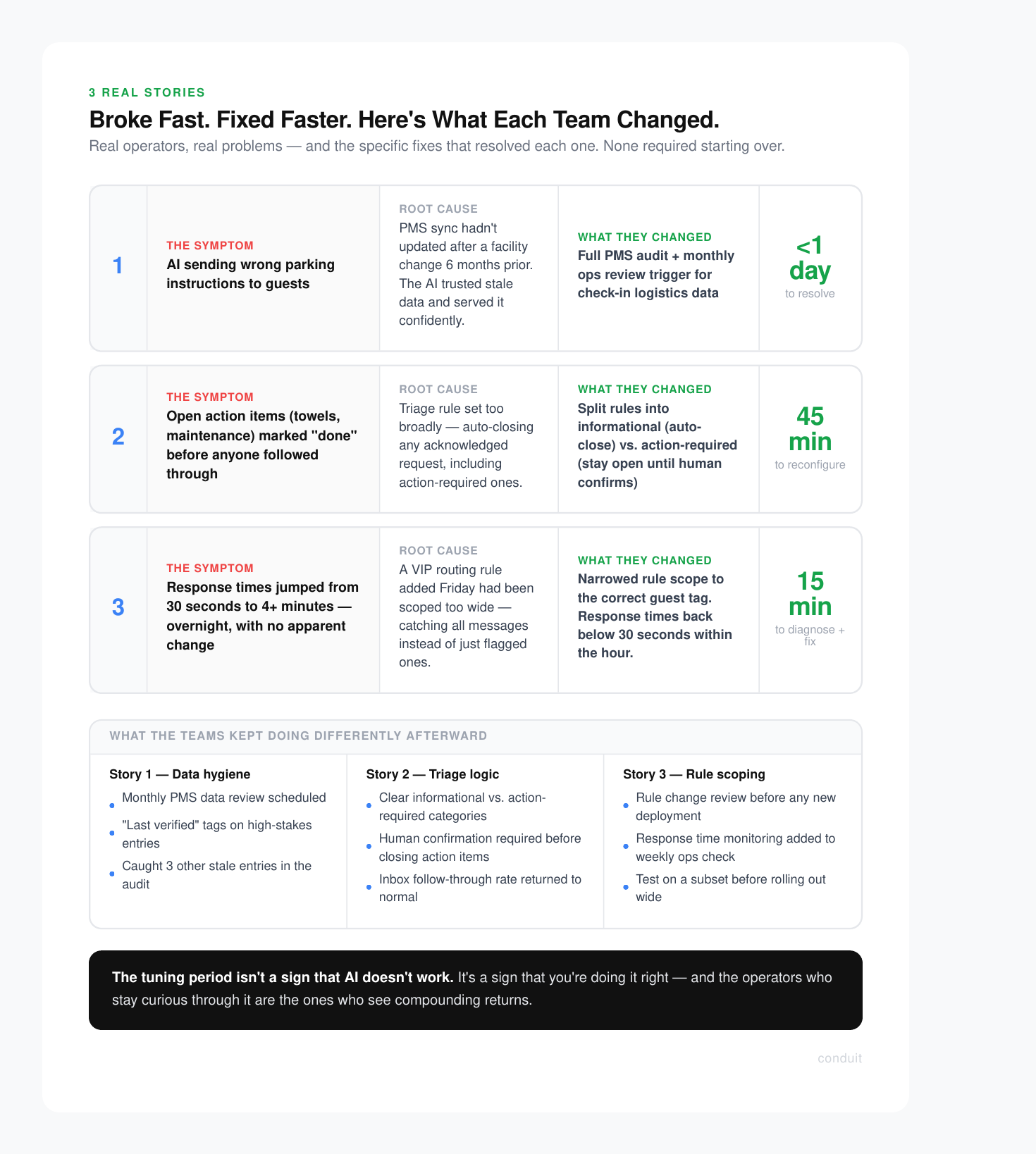
Story 1: The AI That Confidently Gave Wrong Parking Instructions
A property management company managing around 40 short-term rentals launched their AI agent and felt good about the setup. Knowledge base loaded, PMS connected, responses flowing. Then the reviews started mentioning parking.
Guests were arriving at properties and finding that the parking instructions the AI had sent were wrong. Not slightly off. Wrong garage, wrong access code, outdated lot that the company had stopped using six months prior.
The operator was mortified. But when we dug into it together, the root cause was simple: their PMS had a stale data sync. The parking info in the connected property management system hadn't been updated after a facility change, and the AI was pulling from that source confidently, with no way to know the information was outdated.
The fix took less than a day. They audited their knowledge base, updated the PMS records, and added a verification step for any property-specific logistics (parking, check-in codes, key locations) to their monthly ops review.
"I kept thinking the AI was broken. It wasn't. Our data was broken. The AI just trusted us."
That quote stuck with me. The AI did exactly what it was supposed to do. It surfaced whatever it was given. Garbage in, garbage out is not an AI problem. It's a data hygiene problem that AI makes visible faster than a human team would.
What they changed
- Audited all property-specific fields in the PMS for accuracy
- Set a recurring monthly reminder to review check-in logistics data
- Added a "last verified" tag to high-stakes knowledge base entries
The AI hasn't sent a wrong parking instruction since. And because the fix forced a full data audit, they caught three other outdated entries they hadn't noticed before.
Story 2: The AI That Was Too Eager to Close Tickets
A boutique hotel operator came to us two weeks into their deployment frustrated. Their AI was handling a high volume of guest requests well on paper, but their team kept finding tickets marked "done" that hadn't actually been resolved.
Guests had messaged asking for extra towels, a late checkout, or a maintenance issue. The AI would acknowledge the request, confirm it was logged, and then close the conversation. From a workflow standpoint, it looked clean. From a guest standpoint, nobody had actually followed through.
The issue wasn't the AI being careless. It was a triage rule that had been configured too broadly. The rule told the AI to mark any acknowledged request as complete. The intent was to clear out automated confirmations. The result was that real, open action items were getting buried.
This is exactly the kind of thing that feels like an AI failure but is actually a configuration gap.
A conversation engineer on our support team spent about 45 minutes with the operator reviewing the triage logic. They split the rules into two categories: informational requests (which could be auto-closed after a response) and action-required requests (which needed to stay open until a human confirmed completion).
Before vs. After
- Request Type: "What's the WiFi password?" — Before: Auto-closed after reply — After: Auto-closed after reply
- Request Type: "We need extra towels" — Before: Auto-closed after acknowledgment — After: Stays open until staff confirms
- Request Type: "AC isn't working" — Before: Auto-closed after acknowledgment — After: Escalated, stays open until resolved

Within a week, their team reported that the inbox felt like it was actually working with them instead of against them. The AI handled the informational load. Humans stayed focused on the stuff that required follow-through.
The operator's reflection: "We should have thought about this before launch. But honestly, we didn't know what we didn't know until we saw it in action."
That's not a criticism. That's how onboarding works.
Story 3: The Response Time That Tanked Overnight
This one scared a team. They had been running their AI smoothly for about six weeks, averaging sub-30-second response times. Then one Monday morning, their guest response time had jumped to over four minutes. No changes had been made over the weekend. Nothing obvious had broken.
Their first instinct was that the AI had "gone wrong" somehow. They started drafting a message to their guests apologizing for slow responses.
We got on a call and traced it back quickly. A workflow automation had been added by someone on their team the previous Friday to route all incoming messages through an approval queue before the AI could respond. The intent was to test a new escalation path for VIP guests. The scope of the rule had been set too wide by accident, catching every single message instead of just the flagged ones.
One misconfigured rule. Four-minute delays across the board.
The fix was a 15-minute call. We identified the rule, narrowed its scope to the correct guest tag, and response times dropped back below 30 seconds within the hour.
What I want to highlight here is not just the fix but the diagnostic process. When something goes wrong with an AI deployment, the answer is almost never "the AI is broken." It's usually one of three things:
- The data feeding the AI is outdated or incorrect
- A rule or workflow is configured too broadly or too narrowly
- A human-side process hasn't been updated to reflect how the AI operates
All three are fixable. None of them require starting over.

The Mindset That Changes Everything
Every team that has struggled with their AI deployment and then thrived shares one thing in common: they shifted from "why isn't this working?" to "what does this need from us right now?"
That's the new employee mindset.

When you hire someone new, you don't expect them to know your parking situation, your ticket escalation logic, or your VIP guest protocols on day one. You train them. You correct them when they get it wrong. You refine the process together over the first 30, 60, 90 days.
AI is no different. The teams that get the most out of it are the ones willing to stay curious during the tuning period rather than giving up when the first hiccup surfaces.
The tuning period isn 't a sign that AI doesn't work. It's a sign that you're doing it right.
The operators who skip this mindset shift often end up in one of two places: they abandon the deployment early and miss the compounding returns, or they live with a half-configured system that underperforms and confirms their skepticism. Neither outcome is the AI's fault.
If you're in the first few weeks of an AI deployment and things aren't perfect, that's normal. What matters is whether you have a support structure that helps you diagnose and fix issues fast, not one that leaves you guessing alone.
That's what we try to build at Conduit. Not just software you install, but a system you grow into, with a team that helps you tune it.
If you're thinking about deploying AI for guest communications or want to see how the onboarding process actually works, book a demo with us. We'll walk you through a real setup, show you where the common configuration gaps are, and give you an honest picture of what the first 30 days look like.
No glossing over the rough edges. That's kind of our thing.
Stay in the loop
Get the latest on AI automation, product updates, and customer stories.

